AI quoting
How the AI quoting works, and how it stays safe
In short: when a customer sends photos, an AI reads them and drafts a price using only your rates, your price book and your limits. It says what it could see and what you should check. Ordinary code then enforces your limits, and nothing reaches the customer until you approve it on your phone.
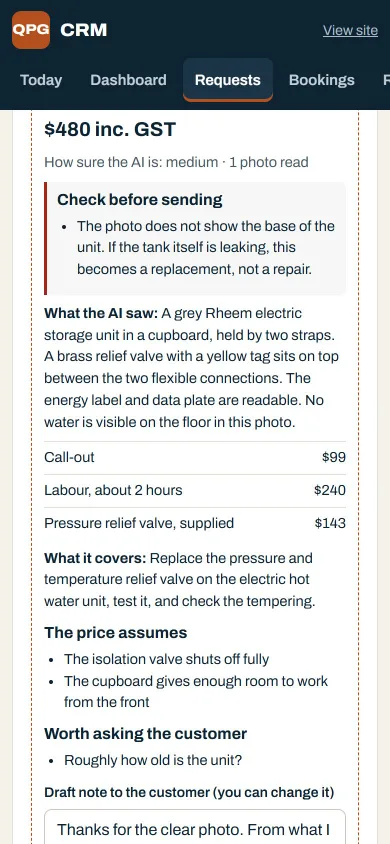
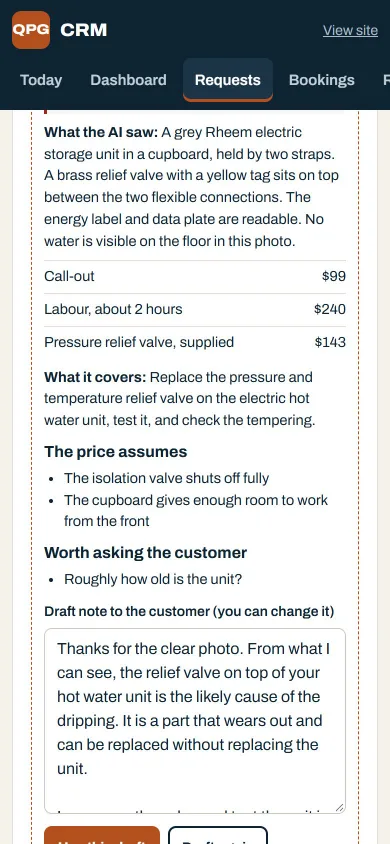
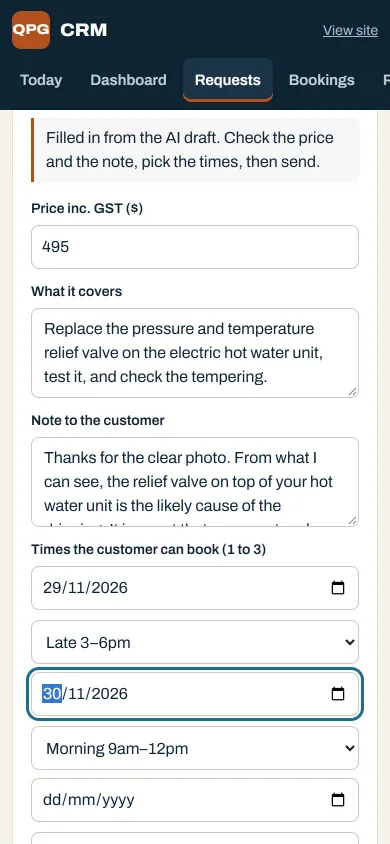
Screens from the recorded demo of the Queensland Plumbing And Gas system. The AI's answers in that recording are scripted examples; everything around them is the real app.
Step by step
What happens when a request comes in
- The request arrivesFrom the photo quote form on your website: job type, description, suburb, photos.
- The AI reads itIn the background, in seconds. If it's slow or fails, you just quote by hand as normal.
- It picks one of four answersA firm price, a site visit, a few questions for the customer, or “not work we do”.
- You approve and sendSending is the approval. The log records what the AI suggested and what you changed.
A firm price
Only when the job type may be priced, there are enough photos, it can see the job, and the price is under your limit.
A site visit
When the job must be seen first, the price would pass your limit, or the photos don't show enough to stand behind.
A few questions
When one or two answers or photos from the customer would let you price it. It drafts the note asking for them.
Not our work
Work you don't take on, or an address outside your area. It drafts a polite note saying so.
The rule it follows: when in doubt between a price and a visit, choose the visit. A wrong firm price costs you money or a customer's trust. A visit costs neither.
Your rules
It prices only from your numbers
You fill in a Quoting rules screen once. The AI can't be switched on until your hourly rate and your highest price are in.
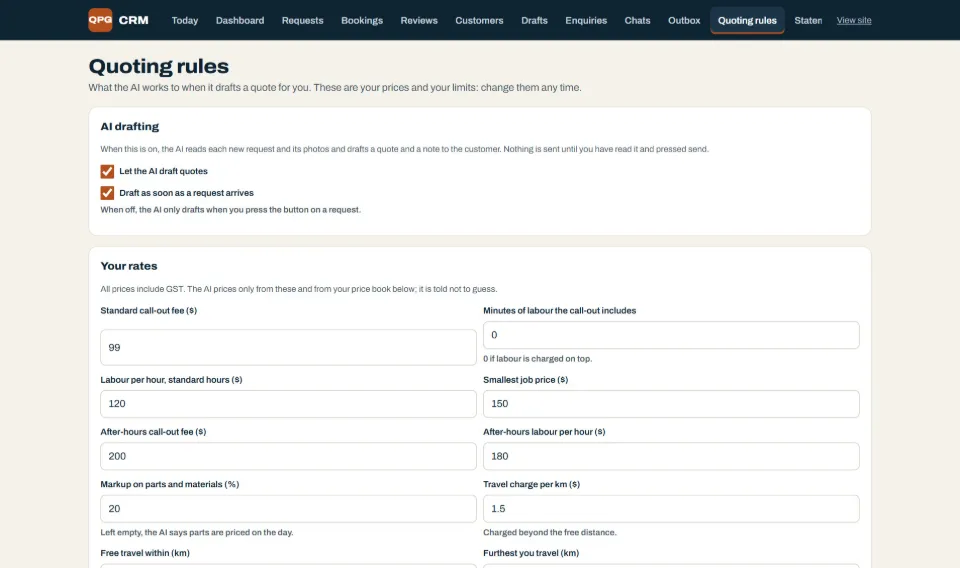
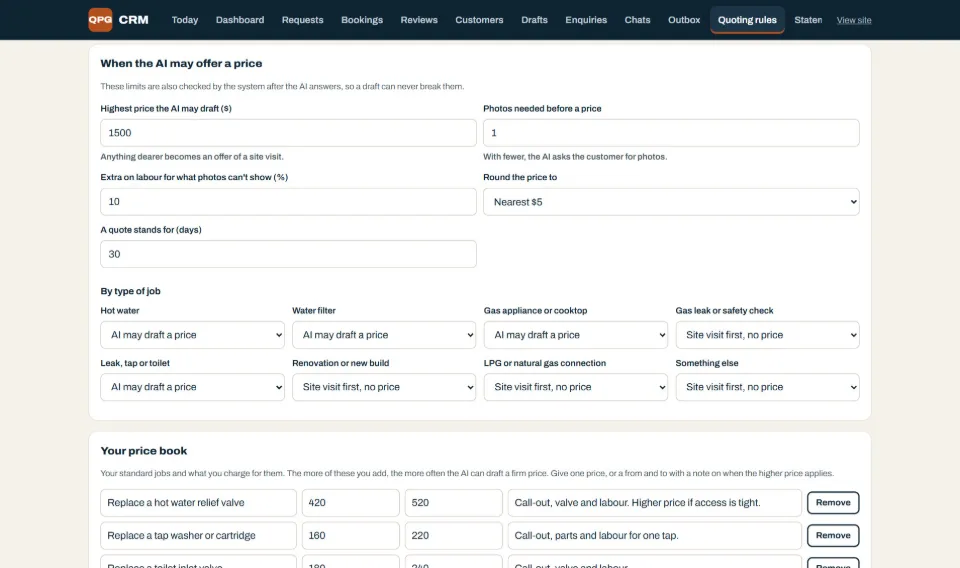
Add a price book of your standard jobs (“replace a hot water relief valve: $420 to $520”) and your wording: what's always included, what never is, your warranty and how you like to be paid. The more you add, the closer its drafts get to how you quote.
Safeguards
Five things stand between the AI and your customer
If any one of them says no, the price never reaches a customer.
- Your own ratesIt's given your rates, price book and wording, and told not to use prices from anywhere else.
- Limits in codeAfter it answers, ordinary code checks your limits. A price that breaks one is removed.
- A visit, not a guessJob types you mark “visit first” never get a price. Gas safety work is always seen in person.
- Words, not ordersThe customer's message is information about the job, never instructions. Attempts to steer the price are flagged.
- You approve every wordThe draft fills in a form. Nothing is sent until you press send.
A customer tries to talk it into a price
One test request in the demo said:
The AI is told to treat customers' words as information and to flag attempts like this. If it were ever fooled, safeguards 2 and 5 still stand. (The AI's answer in the demo is a scripted example.)
A price over the limit is removed by code
When a draft came back at $2,350 against a $1,500 limit, the system removed the price and offered a site visit before the plumber ever saw it as a quote. This is the actual check, in server/quoting.js:
// Krishan's limits, applied in code whatever the AI answered.
else if (amount > rules.maxAmount)
  downgrade('site_visit',
    `The AI's price of $${amount} is above your
     limit of $${rules.maxAmount}, so it was removed.`);
It's ordinary code, not the AI checking itself. In Queensland it also warns when a price passes $3,300, where a written contract is required.
Privacy
What the AI sees, and what it never sees
The AI needs the job, not the person. So the system sends the job and keeps the person out.
Sent to the AI
- The customer's description of the job
- The suburb and distance from you
- Their photos (videos are not sent)
- Your rates, price book and rules
Never sent to the AI
- Their name
- Their phone number
- Their email address
- Their street address
- Tenant details and access notes
Which AI
Anthropic's Claude, used through its business API. Anthropic says it does not use API data to train its models unless a customer agrees otherwise (Anthropic support).
Telling your customers
Australian privacy guidance expects businesses to say when they use AI with personal information. The website's privacy page says photos may be read by an AI to help prepare a quote, and what is never sent.
What the AI can't do
- See what isn't in the photo. Hidden pipework, access, water damage. That's why it lists its assumptions and what to check, and why it prefers a visit when unsure.
- Promise a time. It never offers dates. You pick the times you offer.
- Send anything. It writes drafts. Only you send.
- Replace your judgement. It saves you the write-up. The price is still yours, and so is the licence.
Each draft is one AI request with the photos. A slow or failed AI never blocks a customer's request: the draft says it couldn't help, and you quote as you always have.